


How to Send Trades From TradingView to Your Trading Bot

with ArbitrageScanner!
In a rapidly evolving cryptocurrency landscape, timing is of paramount importance. Many users of the trading platform (TradingView) are now utilizing the capabilities of automation (automatic execution of trades) by means of connecting their account on TradingView with a trading bot. This will allow trades to be executed almost instantaneously after a signal is generated from TradingView; as a result, the exponential potential for profit will be passed on to the trader without the disruption of human emotion interfering with this same process. This article is intended to provide you with information regarding the ways traders can develop and use a complete automated trading environment by bridging the two systems (TradingView; Trading Bot).
Understanding TradingView's Analysis Capabilities
A trader's brain is what assists them in their trade; that is what provides the basic analytical foundation to determine the probability of the occurrence of future events prior to their taking place. Therefore, when developing an automated system that will execute a trade based on historical data, TradingView is an ideal starting point for this process because of its unique ability to analyse worldwide financial data in real-time at multiple timeframes.
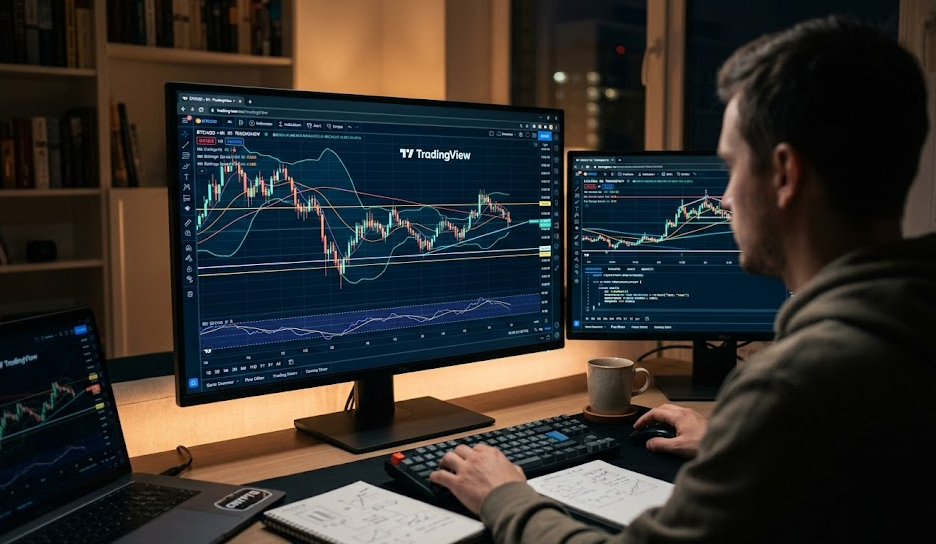
The TradingView Charting Ecosystem
The TradingView charting system provides high-quality charting surfaces and performance, giving traders the ability to evaluate all types of assets and their respective markets from a variety of different timeframes simultaneously, creating the best possible picture of the market in real-time to make informed trading decisions based upon that information. The entire TradingView trading community was developed around providing a real-time analytical execution system to the trading community. Therefore, because TradingView provides a multiple timeframe charting system, it is able to generate the real-time data necessary to provide accurate signal generation to the traders.
Available Technical Indicators and Drawing Tools
With hundreds of thousands of different technical indicators available, you will have access to RSI, MACD, Bollinger Bands and many more, as well as have access to an ever-increasing library of unique trading indicator scripts to choose from based on the preferences of the user base. All of these indicators provide the trader with the analytical tools needed to assist in identifying patterns in the market and predicting volatility within that same market that would be otherwise impossible to detect with the naked eye.
Market Coverage for Cryptocurrency Pairs
Different markets can be accessed through the trading systems; crypto pairs and Bitcoin, however, make it much easier to track via additional resources for traders. The overall goal is that all valuations will be evaluated from multiple exchanges which will allow you to determine that the prices being seen are accurate for each specific exchange from which your bot is being run, so that there are no disparities between the signal and its execution.
Alert System Fundamentals
The most important part of the interface between the two systems is through the alert system. An alert can provide you with a signal when the price of an asset reaches a specific level or when the conditions of a sophisticated trading strategy are triggered. If you've created an automated trading strategy, this step translates your trade logic into alerts that are forwarded directly to your bot for execution.
Integration Setup for Paid TradingView Users
Paid users of TradingView (any plan that is paid for, whether Pro, Pro+ or Premium) will also have the ability to use webhooks. Webhooks are the fastest way for the traders to interface with the bot because they will allow TradingView to "speak" directly to your bot's API without additional intervening software.
Locating Your Unique Webhook URL
Every bot trade copier service will provide you with a unique Webhook URL; you need to copy your bot's Webhook URL from the bot's settings page in order to insert it into your TradingView alert dialog. The Webhook URL will provide the "digital address" (or "digital mailing address") for your alert to get routed to your bot.
Creating Alert Conditions in TradingView
Setting up an alert on an indicator or chart pattern will help you determine specific entry points for placing trades. You can utilize price action to determine when to enter a trade, or you can use volume to determine entry points for a trade. Ensure that your conditional alert criteria are solid enough to account for potential price volatility in the event that your signal may not trigger due to price fluctuations (false positive).
Configuring the Webhook Connection
In the alert settings, on the "Notifications" tab, confirm that the "Webhook URL" box is enabled. Check the URL to ensure it's correct. When an alert is activated TradingView will send the information your bot needs to trade by performing a POST request to your server with the information for you.
Formatting Alert Messages for Trading Commands
Messages in the message box must be written in a specific way. There is a certain code format based on what your bot requires and this is generally written in either JSON or XML which tells the bot exactly how to behave i.e., 'buy BTC/USDT at 5x leverage'. The messages must also contain other elements necessary to function correctly. In other words, the message that you submit into the message box must contain the original syntax that your bot requires in order for it to process and execute the trade correctly.
Step-by-Step Webhook Configuration Process
Set up your first webhook trade with accuracy; if there is an error with the code, it could cause a failure in executing the trade (such as via the failure of the trade being processed correctly due to inputting the wrong information) or cause an out-of-control loss. Follow these procedures so you can improve their trading strategies via automation.
Setting Up Your First Trading Alert
Find any location on your chart by right-clicking on the chart and selecting 'Add Alert'. Also, designate what indicator you want to trigger the automated trade on. Many traders with experience suggest that traders use the 'Once Per Bar Close' setting to eliminate any so-called 'repainting' issues caused by volatility.
Specifying Trading Bot and Coin Selection
In the JSON message to the trading bot what is needed is an indication of what exchange and cryptocurrency pair to trade in (most bots will need to have an element like 'pair': 'BTCUSDT'). This will indicate the correct exchange and pair to trade into.
Defining Buy, Sell, and Other Trading Actions
Within the JSON message to the trading bot should be an indication as to the type of activity that the bot will perform (that a trader will use for their entry and exit) (i.e., via entering/exiting/using a 'stop', etc.). The bot can also be instructed to use a stop-loss order. The way that the programmer will need to indicate the entry and exit points in the message will allow the agent (trading bot) to make decisions with confidence, without any assistance from the trader.
Testing Your Webhook Configuration
Paper-Trading (demo trading) bot with a manual alert to determine if copy trades function is being executed properly. Review the trading activity from the bot log to verify that the bot is able to analyze and process considerable amounts of information efficiently.
Troubleshooting Common Connection Issues
Check your API Keys/Webhook Status if the trades do not trigger after enabling trading. Check your logs on the TradingView Platform to identify possible errors such as 404 or 401, etc. Verify that your bot is active and has sufficient profit and/or balance to make the trade.
TradingView Integration for Free Users
Webhooks cannot be utilized by individuals who do not have a paid subscription (there is simply no option under free accounts). However, there are ways to copy signals from Tradingview to the Exchange without having access to webhooks. This is also a good option for beginners who want to evaluate and learn about the world around them on YouTube tutorials prior to subscribing to a service, plan, etc.
Installation and Setup Process
Free level users usually have the Google Chrome extension "Autoview" or "PineX" that allow them to access the browser notifications from Tradingview and copy trades to the exchange. You must download the extension and connect your bot to the extension via an API Key, in order to accomplish this.
Alert Generation and Implementation
You will create your alerts as Popup Alerts rather than Webhook URL. The extension will monitor the Tradingview Popup Alerts. When an indicator triggers a Popup alert, the extension will see the text and send a trade to your followers' accounts.
Limitations Compared to Paid Integration
Free solutions have greater latency. Since the service must trigger the browser notification - by the time your bot receives it, market conditions may have changed from when the service triggered the notification. Your computer also needs to remain on while you keep your Chart tab open.
Advanced Alert Strategies for TradingView Integration
Advanced Alert Trading Techniques. The majority of traders who are successful use advanced logic to gain insight into what's happening in the Market, by creating complex Alert strategies beyond price alerts, you can replicate these strategies that are used by institutional traders.
Multi-Condition Alert Creation
Our Alert system allows for trading signals from TradingView to be sent out only if certain conditions are met. For instance, only send a trade signal if RSI is Over-Sold AND Volume is Increasing. Filtering out noise & unnecessary alerts through multi-condition Alert scripting can help reduce risk.
Timeframe Considerations for Signals
Timeframe Difference & Understanding Signals: The timeframes of 1-minute trades compared with 1-day trades are dramatically different. High-Speed trading requires managing volatility in regards to timeframes. Make sure your trading bot configuration matches the timeframe of your signals.
Using TradingView Pine Script for Custom Alerts
Using Pine Script to Create Custom Alerts With TradingView: Using the Pine Script, you can take an existing Indicator and adjust it to fit your needs or you can also write a completely custom Algorithm using Pine Script. The key benefit is that you can create your own strategies that calculate stop orders & take profit levels and send these levels as just one signal to your bot to execute all at once.
Alert Management Best Practices
Best Practices in Alert Management: Keep your trading Indicators organized. Routinely evaluate which Alerts are working and Log your trading decisions so you can verify that you made an entry point trade when you intended for your trade to be executed.
Leveraging Community Indicators with Your Bot
Leveraging Community Indicators with Your Bot: Using the "Wisdom of the Crowd" can be one of the best ways to identify potential winners. TradingView has the largest library of Trading Strategies available.
Accessing the TradingView Public Library
You can access all of the trading strategies in the TradingView public library by going to the Indicators tab and searching for Community Scripts. You will find many (literally thousands of them) with high follower counts and good reviews as you search for community scripts that have previously been created by other traders.
Finding and Evaluating Community Indicators
Do not simply copy community indicators without also performing a thorough analysis of their backtested results. TradingView has a built-in Strategy Tester that will show you how much the community indicator will have made or lost in the past based on different market conditions.
Adapting Popular Strategies for Bot Execution
You will need to modify the community scripts before they can send trading orders through your webhook. In order to do this, you may need to make a copy of the original code and add a variable for alert_message to the strategy.entry function in the community script.
Contributing Your Own Indicators
After developing original strategies, you can upload them to the community so that they may help other investors and so you may validate your own analytical tools through contributions from other traders.
Optimizing Your Integrated Trading System
Automation is a great way to trade, but it is not a "set it and forget it" approach. You should always monitor the performance of your automated trading system to ensure you are still trading profitably with your overall market approach.
Balancing Manual and Automated Trading
A combination of manual and automated trading makes the most successful investors in today's market. Use the bot to carry out repetitive tasks, but use your judgment and knowledge to overrule the bot in times of extremely volatile markets or black swan events.
Risk Management Across Platforms
Establish risk management practices for both sides of the trading process. For example, set a stop-loss order on the exchange.
Performance Monitoring and Refinement
Establishing alerts before executing your trade system signals on your trading platform will not only protect your account against the financial ruin of a single signal error but also let you track and alter your trading strategies according to what the actual execution prices are compared to what the prices are on the charts in real-time, so when there is a significant discrepancy between them you'll know if you need to either implement a faster trading bot or alter your trading activity to an alternative exchange.
Building a Complete Trading Ecosystem
For traders looking for diversification through futures contracts on the Ninjatrader or Tradovate, connecting these other tools together within TradingView creates a complete trading ecosystem, allowing you to manage all your trades in one place.
Conclusion
The ability of TradingView to be integrated with your trading bot via webhook connectivity, real-time alerts, and Pine Scripts allow all types of traders, whether they are new to cryptocurrency or experienced companies can use the integration as a resource tool to help them make well-informed decisions and reduce risk when trading in a very imbalanced market.
FAQs
What types of trading commands are able to be sent through TradingView alerts? Traders can send commands to buy/sell trades, set stop losses, take profit, create OCO (One Cancels Other) orders, and modify the amount of leverage on their account via TradingView alerts.
How long will it take the execution to happen after receiving a trading order from TradingView alert? On average, trade execution takes 200 to 500 milliseconds via a paid webhook connection, depending on the bot's efficiency and the API latency to the exchange.
Am I able to connect more than one trading bot to my TradingView Account? Yes! If you create separate TradingView alerts with each having their own unique webhook URL for your trading bot, you may simultaneously copy trade between multiple accounts using your one TradingView Account.
What is the best way to protect my Trading Bot? Do not share your webhook URL publicly. Use an IP Whitelist on your API Keys to ensure that only your trading bots may execute trades on your exchange account.
Can I create TradingView alerts from custom indicators? Yes! You may use the Pine Script programming language on TradingView to determine when a condition is met and set an alert to trigger based on the specified entry or exit conditions for any custom trading indicator that you have created.
Want to learn more about crypto arbitrage?
Get a subscription and access the best tool on the market for arbitrage on Spot, Futures, CEX, and DEX exchanges.

You might be interested

Calculating Cryptocurrency Profits

Crypto Trading in Bear Markets

Crypto vs. Forex Trading
